Most AI tools answer questions. Click Action AI is pitched as the kind that does the clicking — you type one sentence, it opens a cloud browser, works through real websites while you watch, and hands back a spreadsheet. If you have ever spent an afternoon building a prospect list by hand, copying prices from competitor sites, or filling the same form twenty times, that is an appealing promise.
This review looks at what the tool actually is, what it costs, and where the marketing runs ahead of the evidence. The hands-on results below come from an independent test published by Yogesh Agarwal at ReviewAIApps; I have not run Click Action AI myself, and I say so plainly rather than inventing a first-person test.
Disclosure: this article contains affiliate links to Click Action AI. If you buy through them, I may earn a commission at no extra cost to you. My verdict is my own.
What Click Action AI is
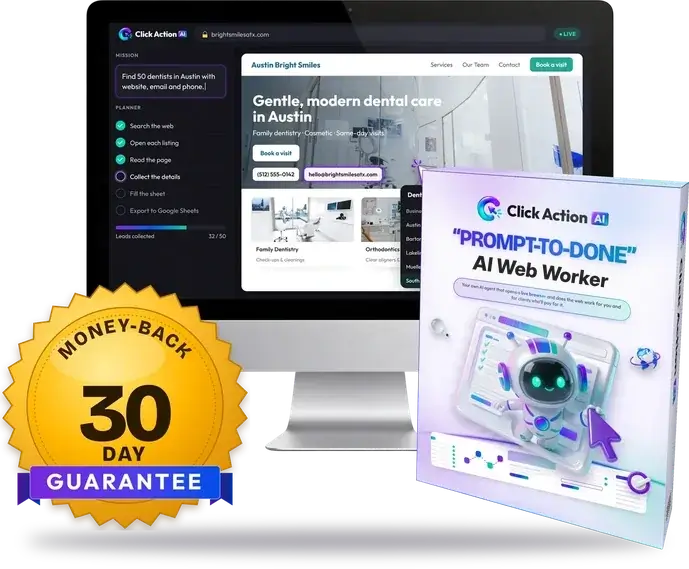
Click Action AI is an AI web worker built by JVZoo vendor Yogesh Agarwal, whose support desk is Pro Web Ventures. Instead of chatting, it takes a goal, plans its own steps, opens a browser on the vendor’s cloud servers, and interacts with live pages: searching, clicking, scrolling, reading and filling forms. You can watch the session in real time, pause and take over, then hand control back. When it finishes, you get a table of results with CSV, JSON and XLSX exports.
The intended jobs are the repetitive browser tasks freelancers and agencies already charge for:
- finding local business leads by city and niche;
- market and competitor research;
- gathering prices, reviews and listings;
- filling web forms and entering data into a CRM;
- publishing content to WordPress.
Everything runs in the cloud, so there is nothing to install and the dashboard works from a phone.
Pricing and the upgrade funnel
The front-end page currently shows $36.95 one-time, with code CAAI6 bringing it to $30.95. The vendor runs a 60-minute countdown and says the price rises every time it expires. Coupon codes aside, the core is a one-time payment, not a subscription.
What the front end includes: 100 browser missions a month, 50 ready-to-run Gig Missions, a live cloud browser, client-ready CSV/Sheets/PDF exports, task history with one-click replay, a mobile dashboard, a commercial licence and seven bonuses. Every purchase carries a 30-day money-back guarantee, subject to the refund terms. The vendor also defines “lifetime” as the life of the product, estimated at roughly five years.
The upgrades are where the cost can climb:
- Action AI Pro ($67, $57 option): multiple agents running in parallel under an “AI Supervisor”, deeper planning, more mission memory, Advanced Research Mode, better step-failure recovery and file/list-driven missions.
- Automation ($97, $87 option): scheduled daily/weekly/monthly missions, event triggers, chained workflows, competitor monitoring and alerts.
- Agency ($147, $137 option): client licence, separate client workspaces, branded deliverables and a sales kit with pricing guides and proposal templates.
- Cinematic Sites AI ($37, $27 option) and Claw Agents AI ($37, $27 option): standalone apps from the same vendor, not features of Click Action AI.
- Bundle ($367, or $267 with code CCAI100): combines the front end with Pro, Automation, Agency and the two extra apps. A DFY mission library ($167) and a Mega Bundle ($147) are offered as further steps. There is also an “Ultimate” option at $367 that adds two more apps and more missions.
Taken individually, the five upsells add about $385 on top of the front end; the full bundle path reaches roughly $581. The independent review noted that the front-end price and the full bundle contents were not publicly disclosed when it was written, so read the checkout page carefully before paying.

See what a mission looks like
The dashboard opens with one box — “Tell your agent what to get done” — plus quick-start chips such as Find local leads, Compare prices, Competitor report, Collect reviews, Fill a web form and Job listings. The New Task screen is more capable than it first appears:
- Response format: table, list, short answer or paragraph.
- Effort level: Quick (10 steps), Normal (25 steps) or Deep (60 steps).
- More Options: watch the run live, create a GIF replay, set an exact step limit, use a saved login, route through a proxy, and restrict the agent to an allowlist of websites.
A good example from the sales page is: “Search Google Maps for roofing contractors in Dallas. Skip any business with no website. For the others, get name, rating, review count, phone and website, then look for an email on their own site. Stop at 6 businesses or after checking 12 websites. Mark as hot if fewer than 300 reviews. Return only the table, hot leads first.” That level of specificity is what gets reliable results.
Key features
1. A real cloud browser you can watch
- What it does: opens a live browser session, navigates real sites, and shows a Live Activity log, numbered steps, screenshots and every page visited.
- Benefit: far more transparency than a black-box agent; you can see where it went wrong and pause or take over at a login screen.
- Limitation: the browser runs on the vendor’s servers, reportedly in India — which showed up in location-based Google Maps tests.
- Use case: a virtual assistant watches a lead run, sees the agent stall at a verification page, signs in, then hands control back.
2. 50 Gig Missions and an optional 111-template library
- What it does: pre-written missions modelled on Fiverr and Upwork gigs; you fill in blanks like city and niche. The larger DFY library adds 111 templates across lead research, competitor intelligence, reporting and publishing.
- Benefit: no blank-page problem, and the templates show what services the vendor thinks sell.
- Limitation: still a paid upgrade for the full library; templates need customising for your market.
- Use case: a beginner picks “local leads”, types “chiropractors, Las Vegas” and runs it without writing a prompt.
3. Planning depth and step/credit controls
- What it does: Quick, Normal and Deep effort levels, plus an exact step cap; the agent spends 10 credits per browser step.
- Benefit: you can keep simple jobs cheap and cap a messy one before it eats credits.
- Limitation: “100 missions a month” hides the real cost. A short task used 50 credits; a failed one used 210. Long runs cost far more than clean ones.
- Use case: set a 10-step limit for a quick price check, then raise it only if the result is incomplete.
4. Exports, workflows and schedules
- What it does: results as CSV, JSON and XLSX, plus the ability to save a mission as a workflow or schedule it to recur (with the Automation upgrade).
- Benefit: turns a one-off research job into a repeatable deliverable for clients.
- Limitation: scheduling is an upsell, and the export step sometimes contains fewer rows than the agent actually collected.
- Use case: a marketer schedules a weekly competitor-price check and gets a spreadsheet every Monday.
5. Safety and access controls
- What it does: saved logins, proxies, website allowlists, step limits, and a pause/take-over control. Important actions ask for approval.
- Benefit: keeps the agent on task and avoids granting it unrestricted access to every site.
- Limitation: your saved logins live on the vendor’s servers, which is a genuine trust consideration.
- Use case: an agency owner restricts a mission to Google Maps and a single CRM domain so the agent cannot wander.
6. Full run transparency
- What it does: live view, GIF replay, step log, screenshots and pages visited, plus a Technical Detail view of raw output.
- Benefit: lets you check the table against what the agent actually found — important, as the tests show.
- Limitation: useful only if you look. “Completed” is a status, not a quality score.
- Use case: when a table has 8 rows but the raw log has 12, you export the missing ones manually.
What happened in the independent tests
These results are from the ReviewAIApps hands-on review, not from my own account. They are the most useful part of that review:
| Test | Cost | Result |
|---|---|---|
| First five wireless earbuds on Amazon.in | 50 credits, 70 seconds, 5 steps | Clean table, but one rating came back “Not specified” |
| Top 25 YouTube videos for a keyword, past year | Under 3 minutes | Date filter used correctly, but only 8 rows exported — mostly Shorts — while the raw log held 10+ full videos |
| Google Maps, 15 chiropractors in Las Vegas | 70 credits, under 2 minutes | 11 complete leads with phone, site, address, rating and review count |
| Same Maps mission repeated | 210 credits, 21 steps | Opened Bengaluru instead of Las Vegas, hit error and verification pages, returned 15 rows of which 14 were doctor profiles and 10 lacked phone numbers |
The lesson is not that the tool is fake — it plainly does real work on real sites. It is that consistency is the weak point, and the step converting raw findings into a final table loses data. Always compare the table with the technical detail before you deliver a list to a client.
User experience
- Learning curve: low. Plain-English tasks or a mission template; no code, no API key.
- Interface: a command box plus quick-start chips, a New Task screen with effort and format controls, a live browser pane and a results page with exports.
- Onboarding: log in on the cloud dashboard, pick a mission or type a goal, set the step limit, run and watch.
- Technical knowledge required: none for basic use. Proxies and saved logins are optional extras.
- Support: Pro Web Ventures help desk and email support; the vendor has a central login shared across his other apps, which is a positive sign of continuity in the JVZoo world.
Pros
- It genuinely types, clicks and scrolls on live websites.
- Simple research jobs are quick and cheap in credits.
- Clean CSV, JSON and XLSX exports.
- Excellent transparency: live view, step logs, screenshots and pages visited.
- Practical controls: step limits, allowlists, saved logins and proxies.
- One-time price rather than a monthly subscription.
- 30-day money-back guarantee on the front end and every upgrade.
Cons
- The same mission can produce very different results between runs.
- Final tables sometimes contain fewer rows than the agent collected.
- “Completed” means the run ended, not that the data is correct.
- Google Maps results were skewed by cloud servers apparently located in India.
- Marketing overreaches: it is not the “world’s first” prompt-to-done agent (OpenAI Operator and Perplexity Comet did this in 2025), and the “$50k a month” banner is unsubstantiated. “Gig value delivered” is an estimate, not earnings.
- “100 missions a month” masks per-step credit costs — a messy run used over four times the credits of a clean one.
- Front-end price and full bundle contents were not disclosed publicly before launch, so check the current checkout carefully.
Who should buy it — and who should skip it
Good fit: freelancers, virtual assistants, agency owners and marketers who spend hours on repetitive web research — prospect lists, competitor prices, review gathering or directory listings — and who will check the output before using it.
Skip it if: you want hands-free income, perfect data without review, or a tool that respects your exact local geography for Google Maps leads. The vendor’s own site says results depend on your effort finding clients, and the independent review says to treat it as a fast research assistant, not an autopilot that prints money.
How it compares
| Tool | Price | Where it runs | Best for |
|---|---|---|---|
| Claude in Chrome | From ~$20/month | Your own browser | General browser tasks in a familiar setup |
| Perplexity Comet | Free / Pro ~$20/month | Full AI browser | Research and browsing in one place |
| Browser Use | Free, open source | Your own machine | Developers who want to build their own agents |
| Click Action AI | $36.95 one-time ($30.95 with CAAI6) | Vendor’s cloud browser | Ready-made gig missions, exports and agency tools |
Where Click Action AI is different: one-time pricing instead of a monthly bill, a library of ready-to-run missions, built-in client exports and an agency upgrade path. The trade-off: your tasks and saved logins are on the vendor’s servers, and the results need checking.
Choose Claude in Chrome or Comet if you want a general-purpose assistant in your own browser and are happy with a subscription. Choose Browser Use if you are a developer. Choose Click Action AI if you want repeatable, exportable research jobs without building anything.
How this review was written
I have not used Click Action AI myself. This article is based on the official sales page and FAQ, plus the independent hands-on review and test results published by Yogesh Agarwal at ReviewAIApps. Prices, coupons and upgrade contents can change at any time — the vendor uses a countdown timer and says the price rises on expiry — so verify the current figure on the checkout page before buying.
Verdict
Click Action AI is a real browser agent, not a chatbot pretending to be one. It is fast and inexpensive on cooperative sites, and its live view and step logs are more transparent than most tools in this category. Its weaknesses are consistency and the export step, both of which mean you should check the data before sending it to a client.
The front end is a reasonable way to test whether this kind of work fits your workflow. Add Automation or Agency only after you have seen it succeed on your own tasks, and keep the 30-day guarantee in your pocket while you try it.
Get Click Action AI at the current launch price Affiliate link · code CAAI6 for $6 off · 30-day money-back guaranteeLast checked against the official product page and the ReviewAIApps hands-on review on 2026-11-27.